How to make a large hero image load fast
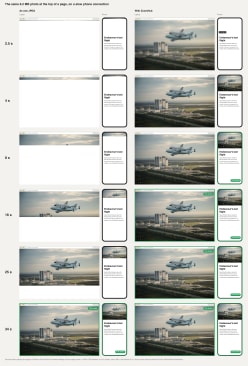
Show it through ZoomHub instead of as one large file. On a slow phone connection, a 6.2 MB photo at the top of a page took 34 seconds to arrive, filling in from the top while the rest of its space stayed empty. Through ZoomHub, the whole photo showed within 4 seconds, blurry for a moment, and had fully loaded after 7 seconds on a phone and 15 on a laptop. The viewer loads only the detail the screen can show, and the rest when someone zooms in.
See it: one photo, loaded two ways
<script src="https://zoomhub.net/a/x1rHhP8wBCe.js?width=100%25&height=640px"></script>
Step by step
Upload your photo
On the ZoomHub homepage, choose the file or paste a link to it. JPEG, PNG, TIFF, WebP, GIF or PDF all work.
Confirm your email
Enter your email address and open the link I send you. If you’re signed in, there’s nothing to confirm.
Copy the embed code
When your photo is ready, choose Embed on its page and copy the code: one line of HTML.
Put it where the large picture was
In the address inside the code, set
width=100%,height=auto,maxHeight=100svhandfit=cover, then paste the code in place of the picture. The photo spans the page at its own proportions and stops at the height of the screen, as a hero image does.
The facts
- How it was measured
- In Chrome, with its Slow 4G network setting (about 1.4 Mbit/s, with 560 ms of latency) and an empty cache, on a laptop (a 1280 × 800 window on a 2× screen) and a phone (390 × 844 at 3×). Both pages were the same apart from their top, with nothing else to load.
- As one JPEG
- 6.2 MB, 7,360 × 4,912 pixels, on both screens. The first rows appeared after about 3 seconds, and the last after 34. Until then, the space for the photo stayed partly empty.
- Through ZoomHub, on a phone
- The whole photo showed within 4 seconds and had fully loaded after 7: 0.5 MB in all, the 29 KB viewer included, less than a twelfth of the JPEG.
- Through ZoomHub, on a laptop
- The whole photo showed after 2.5 seconds, blurry at first, and had fully loaded after 15: 2.0 MB, a third of the JPEG. Neither screen needed the photo’s full resolution, so neither downloaded it.
- Zooming in
- Visitors can still zoom into all 36 megapixels of the photo. The detail loads only when they do.
- File size
- Up to 1 GB per file on Free, and 5 GB on paid plans.
- Cost
- Free for personal use, up to 10 images. Commercial use needs a paid plan.
Questions
Wouldn’t a smaller JPEG do?
It would load faster, and a srcset can pick a size for each screen. But a photo small enough to load quickly has lost the detail people would zoom into. ZoomHub sends a small version first and the detail on request, so the page stays fast and the whole photo stays one zoom away.
What about a progressive JPEG?
A progressive JPEG also shows a blurry version first, but it only turns sharp once the whole file has arrived, and every visitor downloads all of it. ZoomHub sends only the detail the screen can show.
Does the photo have to be at the top?
No. Embeds further down the page start loading as they come near the screen, so they don’t slow down what visitors see first.
Can I use it on a commercial site?
Yes, on a paid plan, which also removes the “Powered by ZoomHub” badge. Free is for personal use.